The RayNeo iO are the best smart glasses of this particular type that I’ve used so far. Not because they reinvent the idea, but because they take so many of the best bits from the competition and make the whole experience feel more polished.
They look remarkably like ordinary glasses. They’re light enough to forget about. Yet, from behind the lenses, there’s a bright green display delivering captions, reminders, AI responses and even a teleprompter straight into your field of vision.
That combination matters more to me than squeezing every conceivable feature onto my face. Full-colour smart glasses from the likes of Meta and Snap are interesting, but the examples I’m comparing here are unquestionably bulkier. There’s only so much technology you can hang from your ears before the glasses start wearing you.
My testing was carried out before launch, so the software, subscriptions and feature selection discussed here reflect that stage. Final retail pricing wasn’t available, which leaves one important part of the buying decision unresolved.
Quick Summary
- The 33g frame, discreet display and tactile crown make the RayNeo iO unusually comfortable and practical.
- Live Captions supports translation and same-language subtitles, while Live Cues supplies conversational context with noticeable delays.
- Eight AI model choices impressed me, but access requires RayNeo’s Pro subscription rather than personal accounts.
- Life Log creates useful daily records, but audio-only context can produce omissions and mistaken entries.
Table of Contents
- Design and Comfort: Smart Glasses That Mostly Disappear
- The Green Display Is Sharp, Bright and Easy to Read
- The Smart Crown: Slightly Odd to Look At, Excellent to Use
- Everyday Features: A Short Menu With Some Powerful Tools
- AI Model Choice: RayNeo Gets This Important Bit Right
- Life Log: A Proactive Assistant With Some Real Limitations
- What I’d Like RayNeo to Add
- Verdict: A New Benchmark for Monochrome Smart Glasses
Design and Comfort: Smart Glasses That Mostly Disappear
This is currently my favourite approach to smart eyewear: a discreet monochrome display rather than an obvious collection of cameras and audio hardware. Products from Even Realities and the recent MemoMind lineup follow a similar philosophy. The point is to make the technology useful without making the glasses look like equipment issued for an expedition.
The RayNeo iO do that exceptionally well.
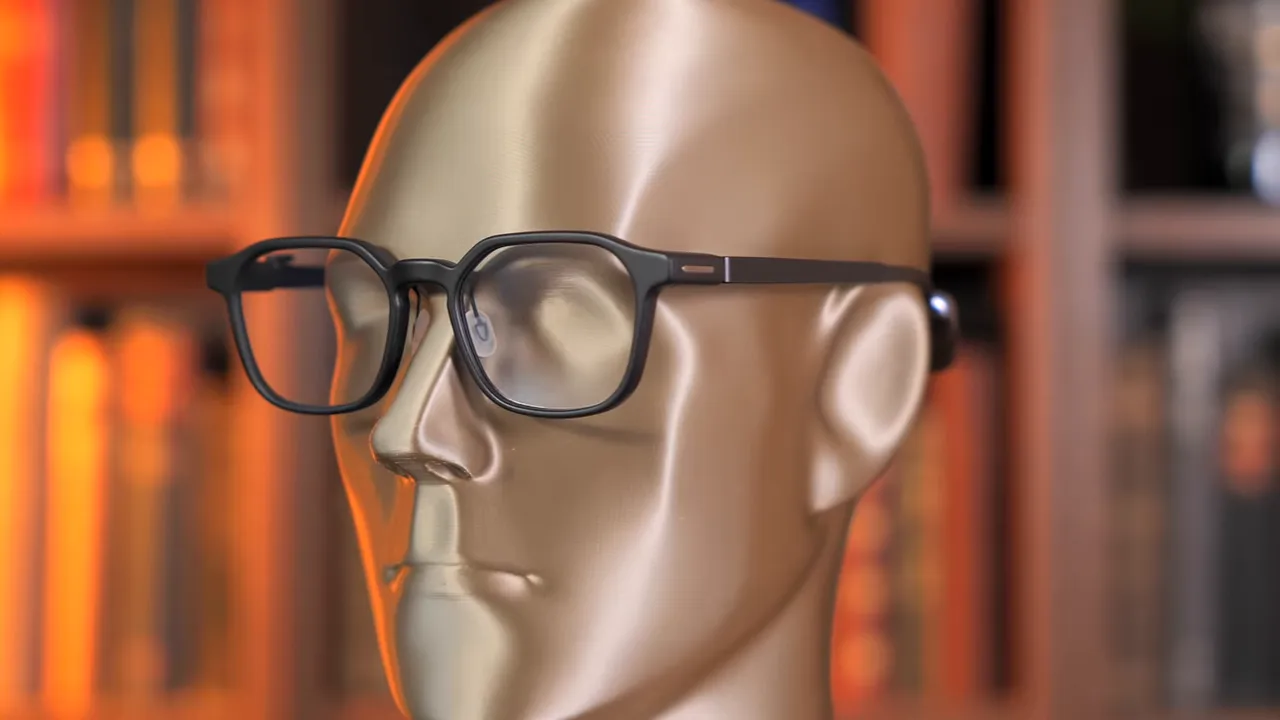
At 33g, these are the lightest glasses with this type of display technology that I’ve tried. That’s roughly 3g lighter than the previous lightest pair we tested. It might sound like a tiny difference, but something resting on your nose all day doesn’t need to be dramatically lighter for the improvement to matter.
The other useful headline specifications are:
- Two-day battery life, even with the Life Log feature enabled.
- IP54 protection for dust and splash resistance during wear.
- A discreet display system that is noticeably harder to spot from outside than competing examples I’ve tested.
That last point surprised me. With some smart glasses, the display area catches the light almost immediately as you move away from a straight-on angle. These were unusually difficult to capture on camera because the display elements were so elusive.
They aren’t completely invisible. Certain angles and lighting conditions still reveal reflections that differ from the rest of the lens. But they are significantly less noticeable than the alternatives I’ve used.
I can’t confidently explain why. On paper, lens transparency is actually about one percentage point lower than a few competitors. Perhaps the slightly darker overall lens helps everything blend together. Perhaps there’s witchcraft involved. Whatever RayNeo has done, the result is convincing.
The Green Display Is Sharp, Bright and Easy to Read
A discreet exterior would be fairly pointless if the display itself were unpleasant to use. Fortunately, this is another area where the RayNeo iO impressed me immediately.
The image looks large, pin sharp and well positioned for my eyes. With other glasses, I’ve sometimes had to shuffle the frame around my face to find the right viewing position. These fitted me straight away, without any alignment problems.
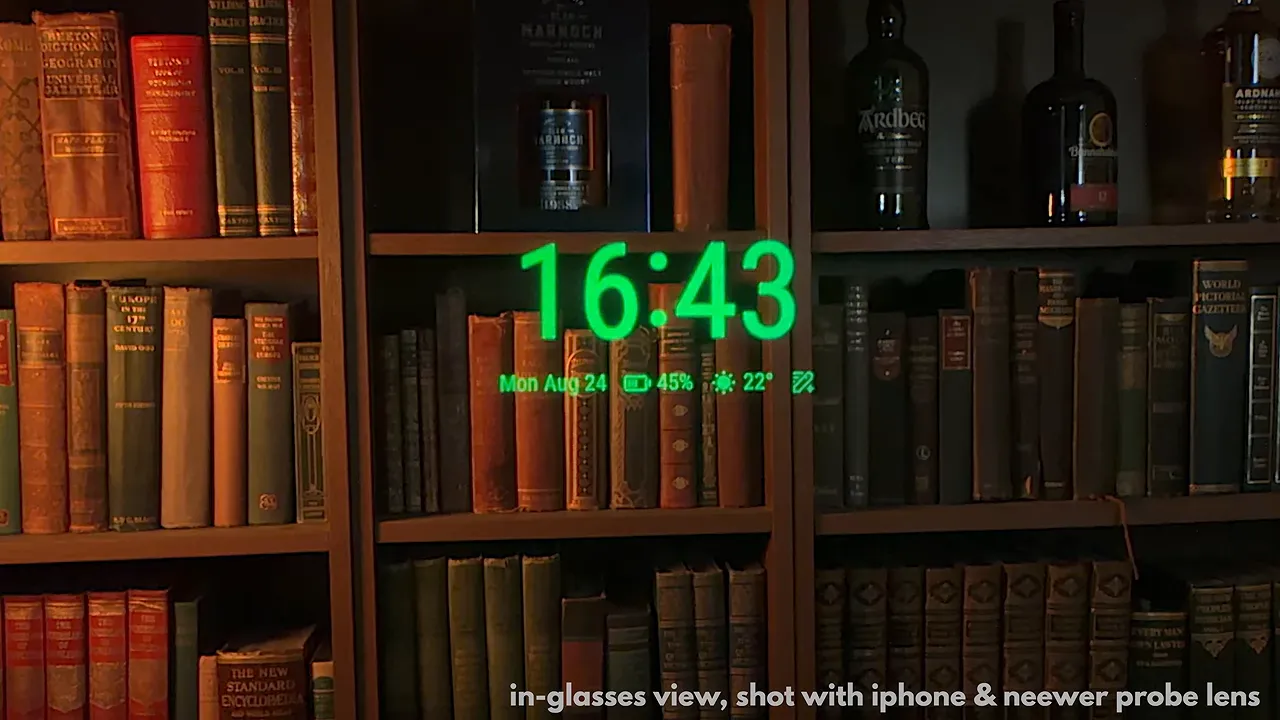
Brightness is rated at 1,300 nits. That isn’t the highest figure in this niche, but it’s close, and the display looks very bright in use.
The companion app also provides adjustments for:
- Display height: move the image up or down within your vision.
- Focal distance: choose close, mid or far to find a more comfortable apparent viewing distance.
The focal-distance setting is a welcome addition, although three presets are fairly limited. I’d like more fine adjustment so you can really dial it in. For my eyes, though, the out-of-the-box experience was excellent.
A Smoother Interface, Not Just a Better Image
The whole interface also feels more fluid than the competing glasses I’ve tried. Transitions between functions look smoother, and there are little animations that make the hardware feel a step more capable.
Because I tested these before launch, I couldn’t confirm whether that improvement came from more processing power, a higher refresh rate or a combination of the two. It’s an observation about the experience, not a confirmed specification.
There are even small novelty interactions available through the crown when the main display is off, including a card-selection animation and a ping-pong-style game. Will I regularly use my glasses to choose a random card? Probably not. But these are interesting demonstrations of how much more fluid this type of display is becoming.
More importantly, that fluidity carries into ordinary menu navigation. Function icons animate neatly as you move between them. It’s a small detail, but enough small details add up to something that feels properly finished.
The Smart Crown: Slightly Odd to Look At, Excellent to Use
The RayNeo iO are the first smart glasses I’ve used with a physical scroll wheel on the arm. RayNeo calls it the Smart Crown, and I have two quite different opinions about it.
Aesthetically, I’m not entirely sold. It’s a conspicuous little bump that introduces some asymmetry and gives away the fact that these aren’t entirely normal glasses.
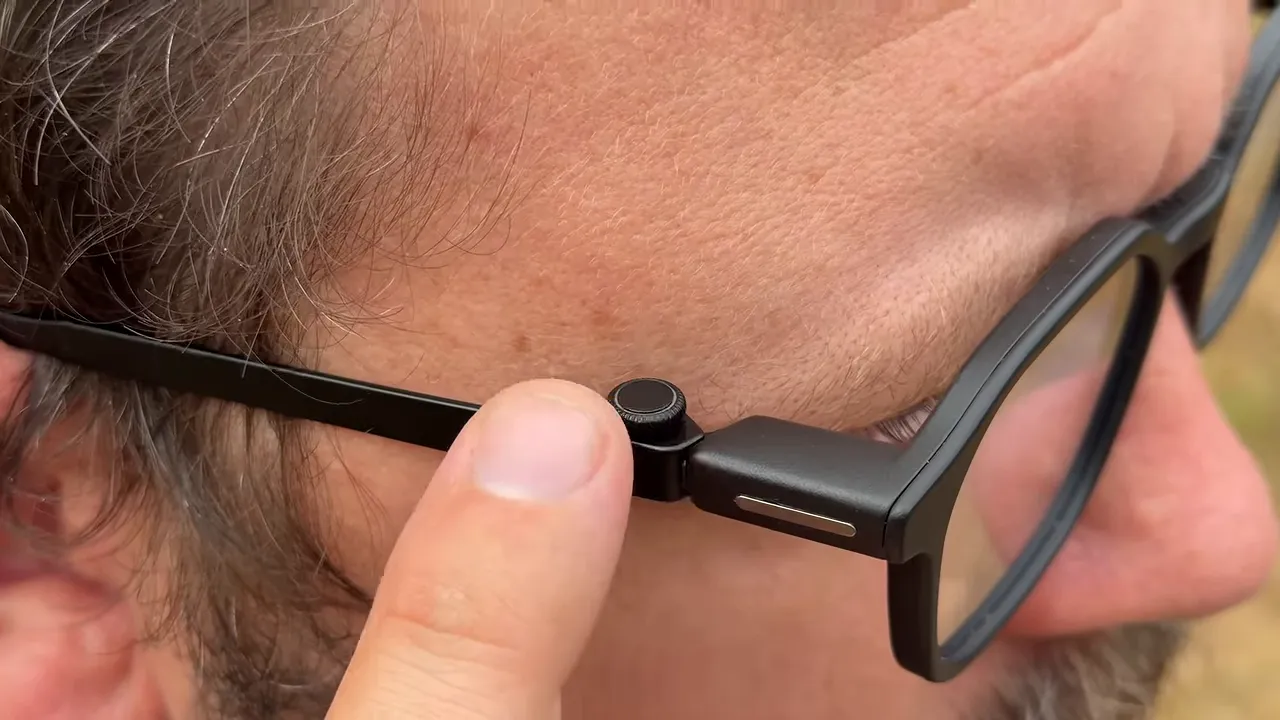
Fortunately, at 6ft 8in, most people get a sufficiently low-angle view of me that both the crown and my bald patch remain naturally concealed. A rare double victory.
Functionally, however, I’m absolutely sold.
A physical wheel is much more reassuring than an invisible capacitive swipe panel. You can feel where it is and feel it turning. There’s none of that aimless stroking of the glasses arm while trying to work out whether you’re touching the right bit.
It also works with gloves, which is a substantial advantage in winter. That’s the sort of practical improvement that matters far more than how impressive a control scheme sounds on a specification sheet.
Scrolling the crown moves through the app menu, which currently includes Voice Memo, Live Captions, Live Cues, To-Dos, Teleprompter, Life Log and Focus.
Focus is essentially a do-not-disturb mode. It suppresses interruptions, useful whenever you don’t want notifications appearing in front of your eyes, particularly while driving.
Everyday Features: A Short Menu With Some Powerful Tools
Voice Memo: Record, Transcribe and Flag Important Moments
Voice Memo is one of the simpler features, but it has obvious practical value. It records conversations as playable audio files and creates a written transcription in the companion app.
You can also press the crown during a recording to flag an important moment. That makes it easier to return to a particular section later rather than searching through an entire meeting.
Think lectures, seminars, regular work meetings or that unfortunate conversation with HR where you need to remember exactly how long you’ve been given to clear your desk.
It’s not a spectacular party trick. It’s simply useful, which is rather the point.
Live Captions: Translation and Same-Language Subtitles
RayNeo’s translation feature is called Live Captions. It supports translation from 55 languages, with claimed recognition of 109 accents. I wouldn’t personally volunteer Yorkshire as the definitive stress test. Some mysteries should remain unsolved.
The basic experience is familiar: select the languages and the glasses display a live translation of speech.
What I particularly like is that you can disable translation while keeping captions enabled. That gives you subtitles in the language being spoken, rather than converting it into another one.
For someone who is deaf or hard of hearing, that could be much more meaningful than a convenient travel feature. Having spoken words appear directly in your field of vision is a compelling use of this technology, and I’m delighted to see it included.
Live Cues: Contextual Information During Conversations
Live Cues goes beyond reproducing speech. It listens to a conversation and uses AI to display information it considers relevant.
If a discussion turns to the average number of pints a British man drinks each week, for example, it can attempt to supply an answer without anyone reaching for a phone. In my demonstration, it offered six or seven pints. I’ll leave both the statistical verification and the judgement of my own consumption to someone else.
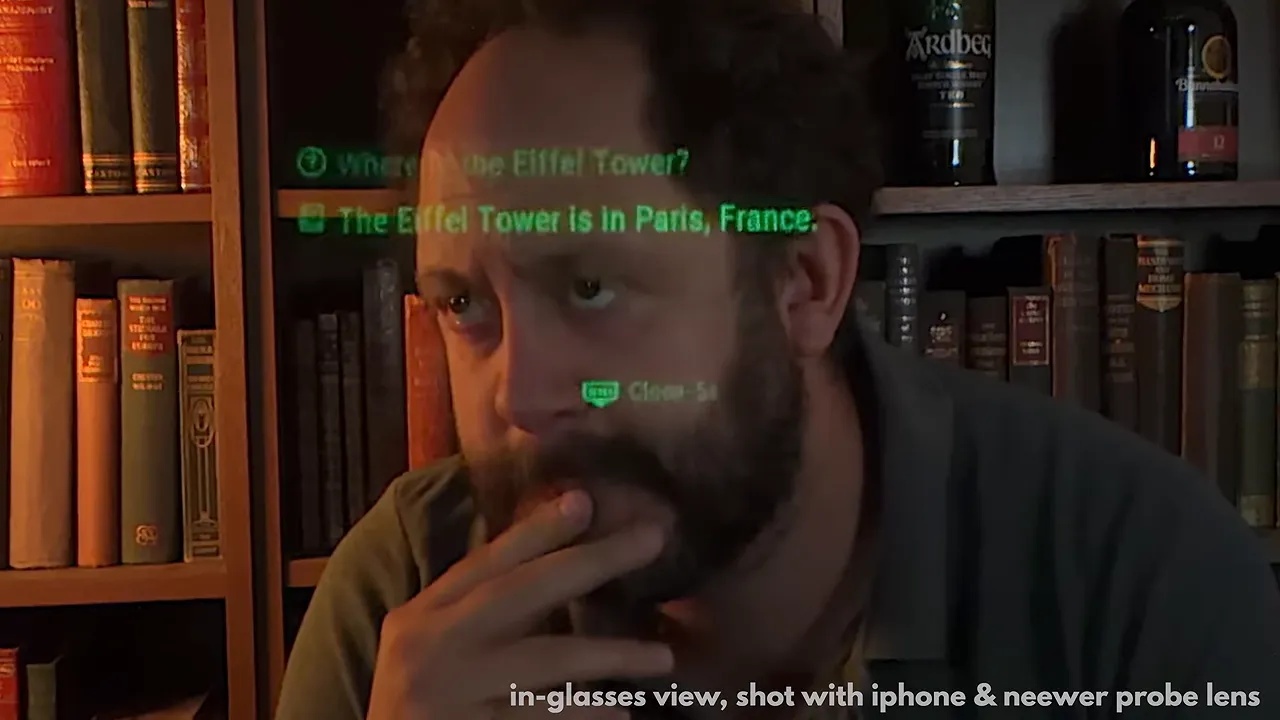
I’ve encountered a similar idea in Halliday smart glasses, but I prefer this implementation. Presenting the extra context as conversational subtitles feels more useful, particularly during meetings and seminars.
It is, admittedly, a little Black Mirror. It also doesn’t always select the information you actually need.
The bigger practical limitation is speed. In my testing, relevant information typically took five to ten seconds to appear. In a quick conversation, that can be the difference between contributing something useful and confidently supplying a beer statistic after everyone else has moved on to the decline of the British pub.
Live Cues was labelled beta during testing, so there is room for improvement. Connectivity appears to be a limiting factor, though. More local processing might help in principle, but that creates its own challenge when the entire device weighs 33g. Strapping a Mac mini to the back of your head would rather undermine the design brief.
To-Dos and a Surprisingly Useful Teleprompter
The To-Dos app presents upcoming tasks. Its greater value becomes clearer alongside Life Log, which can identify tasks from the conversations it hears.
The teleprompter displays your own text in front of you, with three ways to control it:
- Steady scrolling: text advances at a set pace.
- Manual control: turn the crown to move through the text yourself.
- Smart Follow: the system listens to your speech and advances the text as you read.
Smart Follow is the most useful option for me. It keeps the experience hands-free without forcing you to keep up with a fixed scrolling speed. For presenting or public speaking somewhere you can’t install a conventional teleprompter, that makes a lot of sense.
AI Model Choice: RayNeo Gets This Important Bit Right
Like most AI smart glasses, the iO let you activate a language model using a button or wake word. Responses appear as text in the display.
That’s useful, but the feature I care about most is the choice behind it.
I strongly believe hardware manufacturers should let people decide which large language model they use. AI responses can sound confident and neutral even when they contain errors, assumptions or bias. My concern is that an assistant sitting so close to everyday life could subtly influence how someone understands the world.
That isn’t a reason to treat every answer as sinister. It is a reason to remain critical. The NIST AI Risk Management Framework offers useful wider context on evaluating AI trustworthiness and risk.
At the time of testing, RayNeo offered eight model choices:
- RayNeo’s own assistant
- Gemini Light
- Gemini Pro
- Claude
- ChatGPT
- DeepSeek
- Qwen
- Kimi
That is the broadest selection I’ve encountered from a hardware manufacturer in this category. Bravo, RayNeo.
There is one substantial limitation: access runs through RayNeo’s Pro subscription, rather than allowing you to sign into your own existing accounts for those services.
Consequently, you don’t get your existing conversations, projects or accumulated context from the AI accounts you use elsewhere. Bringing your own accounts would take this a step further.
There is, however, a benefit to RayNeo handling the AI within its own system. That becomes apparent with the most ambitious feature here.
Life Log: A Proactive Assistant With Some Real Limitations
Life Log is the feature that moves these glasses beyond tools you deliberately activate and towards an assistant that works in the background.
The menu control itself is simple: turn it on or off. A small white light at the rear indicates when it’s enabled.
Once active, Life Log listens throughout your day and adds information to a daily log in the companion app. It can identify tasks, dates and other relevant details, while gradually building a profile intended to help it understand you better.
It then produces a journal-like breakdown of conversations and key moments. Rather than repeatedly asking an assistant to remember things, the idea is that it starts doing some of that work automatically.
This is the shift from reactive AI towards proactive, agentic AI, and I think it’s a significant direction for wearable technology. Similar ideas are already appearing in necklaces, badges and other devices. RayNeo’s implementation works particularly well with its companion app.
The Privacy Question Deserves a Proper Answer
A device listening throughout the day is understandably going to worry people. I wouldn’t brush that aside just because the resulting journal is convenient.
The first practical reassurance is control. Life Log can be disabled directly from the glasses menu, and its status light provides an indication of whether it is active. Private conversations don’t need to become part of your daily log.
The second is RayNeo’s description of its processing approach. The company says Life Log:
- Prioritises on-device processing, keeping as much data local as possible.
- Irreversibly anonymises information on the device before sending anything that requires cloud computation.
- Does not send raw audio away from the glasses in an identifiable form.
I could not independently verify those privacy claims. They sound promising, but a manufacturer’s assurance and a verified security assessment are not the same thing.
My broader view is that proactive assistants are likely to become increasingly common. That makes the controls and the handling of personal information more important, not less.
It Can Hear Your Day, but It Can’t Understand All of It
The biggest functional limitation is that Life Log relies on a single sense: hearing.
That means it misses a huge amount of context. I probably spend about 90% of my working time dealing with email or writing scripts. During those stretches, there’s very little useful spoken information for the glasses to process.
They can hear the frantic keyboard tapping. They can’t understand the email that caused it.
One potential future solution would be optional access to work files through something like Dropbox or Google Drive. That could provide context about what I’m actually doing. To be clear, that’s an idea for improvement, not a feature available in my testing.
The opposite problem also occurs: sometimes Life Log hears something and assumes it belongs to your own experience.
It often correctly recognises audio as a podcast or other media. But on a couple of occasions, it attributed events from played content to my day instead.
That’s worth remembering if you leave it enabled during television or other media playback. Otherwise, your journal may confidently recall the afternoon you rode a dragon into battle at Tumbleton. I don’t believe I did that, although my memory is precisely what this feature is supposed to be helping with.
My practical advice is to switch Life Log off during media playback if you want to avoid those false entries. The feature is impressive, but its daily account still needs a human sanity check.
What I’d Like RayNeo to Add
For all the polish, there are still gaps. My main requests for future updates are:
- iOS calendar integration to make scheduling more useful.
- More online account integrations beyond the Gmail option available during testing.
- Navigation, ideally with a map and directional guidance in the display.
- Personal AI account support so existing projects and conversations can carry across devices.
- Finer focal-distance adjustment rather than only close, mid and far presets.
Because this was a pre-launch review, some of those requests may be addressed by later software. Equally, features and subscription arrangements can change, so the version available to buy deserves a fresh check.
Verdict: A New Benchmark for Monochrome Smart Glasses
The RayNeo iO don’t do something radically different from every other pair of display-equipped smart glasses. What they do is bring the strongest ideas together and execute them unusually well.
The frame is exceptionally light. The display is clear and discreet. The interface feels smoother. The crown is more practical than I expected. Live Captions has genuine accessibility potential, and the choice of AI models is a refreshing change from being locked into one provider.
Life Log is ambitious and useful, provided you understand its privacy implications and its tendency to miss or misread context. Live Cues still needs to get quicker. The crown remains a slightly odd-looking addition. These aren’t flawless glasses.
Price is also the unresolved question. At testing, launch was expected around 4 September, but I didn’t know the final RRP. If they’re priced competitively within this niche, RayNeo has a real winner. The current RayNeo iO product details are worth checking for the latest price, specifications and available features.
As a complete experience, these are the best glasses of this type I’ve tried. They feel like more than a routine generational improvement. RayNeo has taken the best bits of the category, improved them and made the technology easier to live with.
And yes, I love them.


