XGIMI, a company better known for high-end projectors, is behind something I certainly wasn't expecting: a pair of smart glasses that beams information into your vision while looking remarkably like ordinary eyewear.
The MemoMind One can show messages, news, stocks, and live translations on a discreet green heads-up display. It also has speakers, so you can actually converse with its AI rather than wait for an answer to crawl across your lenses.
But the genuinely extraordinary bit is what happens when you enable its long-term memory. These glasses can listen throughout your day and turn what they hear into notes, memories, journals, and useful observations without you repeatedly asking them to.
Brilliant? Slightly terrifying? Yes to both.
This is a review of a pre-launch prototype, with software that changed considerably during testing. Even with that qualification, the MemoMind One has given me one of the most compelling glimpses yet of where AI smart glasses could be heading.
Quick Summary
- A larger, brighter green display and built-in speakers make everyday interactions more intuitive.
- Optional long-term memory turns overheard conversations into journals, notes, insights, and wishlist entries.
- Audio-only context misses silent activities, so daily summaries can misrepresent how you spend your time.
- The standout contextual AI features require Ultra, and the pre-launch product carries crowdfunding risks.
Table of Contents
- A Properly Discreet Pair of Smart Glasses
- A Bigger, Brighter Display That Still Feels Like Magic
- The Speakers Matter More Than Their Sound Quality
- How the Dashboard and Controls Work
- An AI Assistant With Long-Term Context
- Always-Listening Memory Is the Feature That Changed My Opinion
- Privacy Controls Help, but This Still Deserves Serious Thought
- OpenClaw Integration and the AI Choice I'd Still Like to See
- Launch Plans, Ultra Subscription, and Crowdfunding Risks
- My Verdict: A Remarkably Refined Glimpse of What's Next
A Properly Discreet Pair of Smart Glasses
If the MemoMind One looks familiar, that's understandable. The sleek design and single-colour display immediately reminded me of the Even Realities G1 glasses I tried previously. In my experience, though, MemoMind has moved this particular form factor forward in almost every meaningful way.
First, the engineering is bloody lovely. The combination of magnesium, titanium, and aluminium alloys looks classy rather than conspicuously technological. There are three styles planned for launch, alongside different colours and customisation options. The Archive design is my favourite. It makes me look as though I might know what I'm talking about.
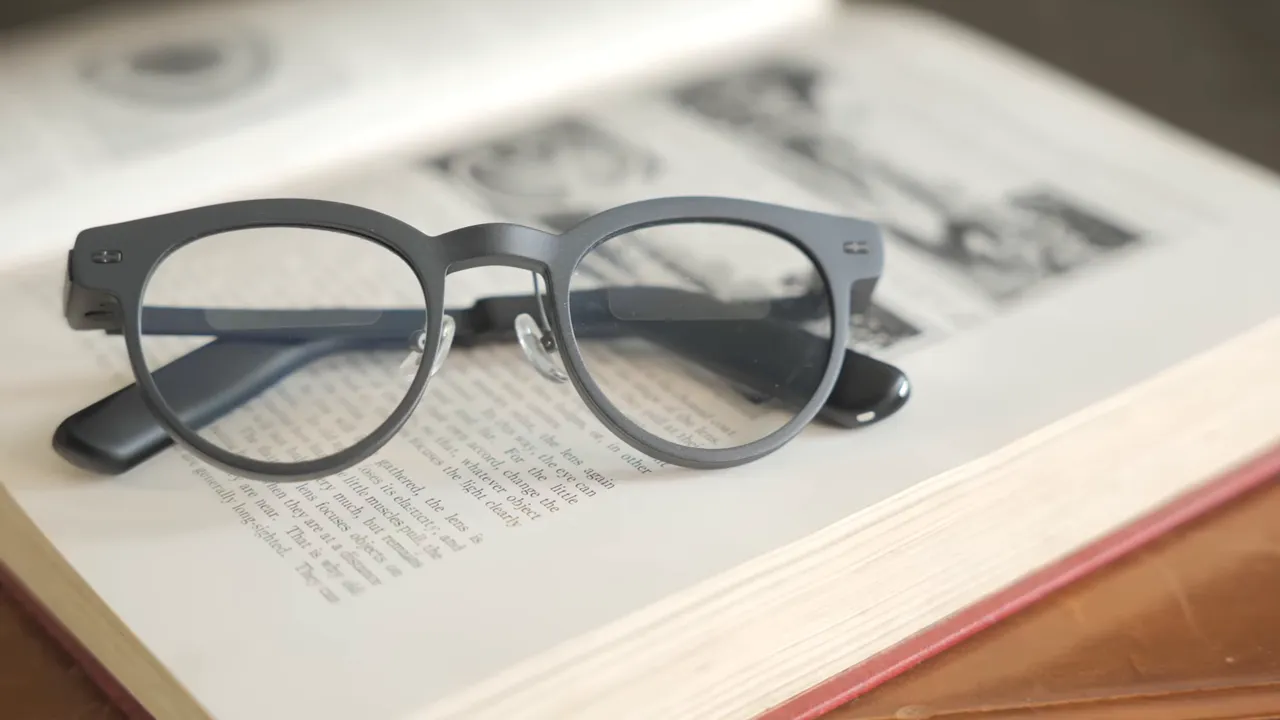
The arms do get thicker towards the rear to accommodate the electronics, but not to a degree that makes them look ridiculous. Compared with the Even Realities glasses, the thickest section is actually narrower, although it extends further along the arm.
Considering MemoMind has also squeezed speakers into this design, that's an impressive bit of packaging.
A Bigger, Brighter Display That Still Feels Like Magic
The single-colour green display makes the world feel a little more Matrix-like. More importantly, it's the biggest display I've used in glasses of this style, with a stated 75% increase in size over the narrower display experience I'm comparing it with.
Much of that improvement comes from extra height. That sounds like a dull specification until you use it.
A taller display can put information closer to the centre of your vision and show more lines of text at once. You're not constantly waiting for the next fragment of a response to scroll into view. That becomes particularly useful with longer text and the teleprompter.
Brightness can reach 2,000 nits, and I found it much easier to see in nearly all conditions than previous displays I've tried in this form factor.
Despite that brightness, other people cannot read the information you're seeing. Having text floating in front of you while nobody else can see it remains one of those technologies that makes you stop and grin like an idiot.
There is a small giveaway, though. At certain angles, the rectangular display areas catch the light differently from the rest of the lenses.
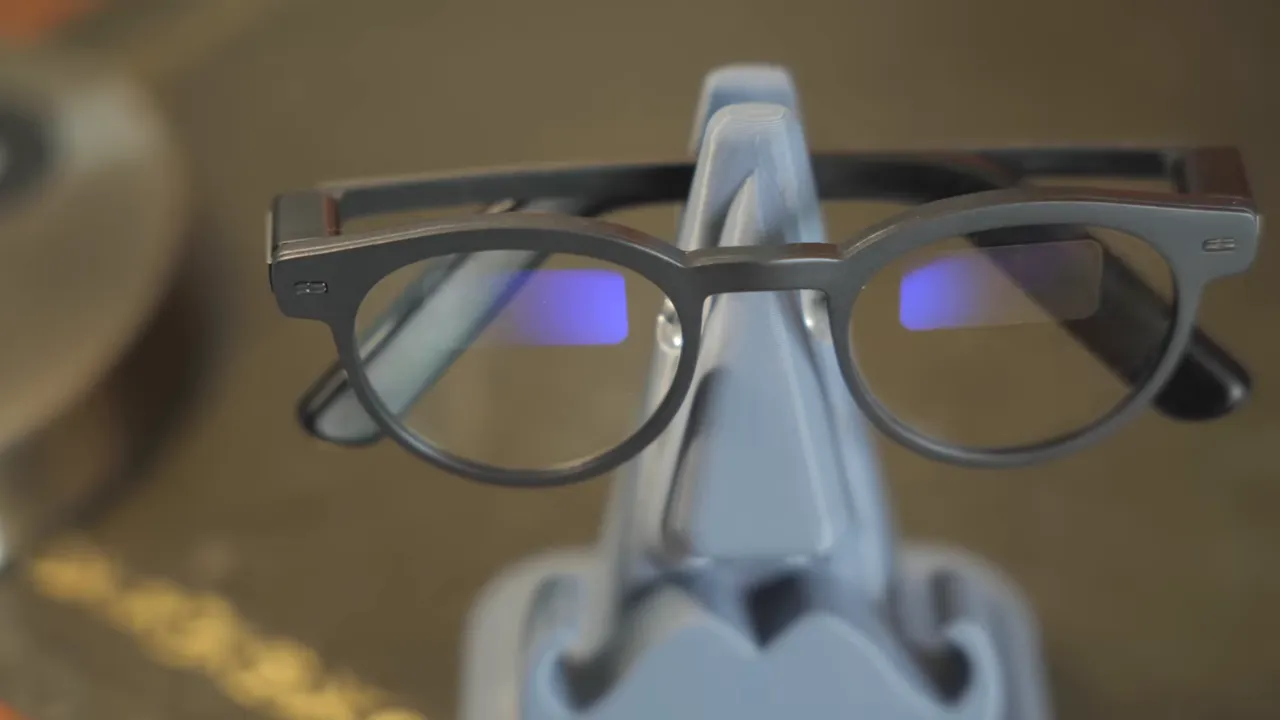
Most of the time, they're unobtrusive. Even if somebody notices the rectangles, these look sufficiently like normal glasses that they could easily mistake them for part of the lens design.
The Speakers Matter More Than Their Sound Quality
For me, speakers should be a core feature of AI smart glasses. A display is useful, but being able to hear an answer means you don't have to read every response or pause what you're doing to follow scrolling text.
MemoMind combines both approaches: information in your vision and audio from the arms. It bridges the gap between display-focused glasses and the audio-led Meta Ray-Bans I've used.
The speakers were developed in collaboration with Harman Kardon. That name raised my expectations, so here's where I need to rein them back in.
The speakers are fine for speech. They are not a replacement for good music headphones.
They sit above your ears, further away from the ear canal than a typical open-ear headphone arrangement. The result leans towards treble, with acceptable clarity but limited bass. You're probably not going to choose these for an immersive session with the Tron soundtrack. Your treasured Mongolian throat-singing collection may also deserve better.
There are audio settings to experiment with, including standard and Harman Kardon tuning. Ironically, I preferred the standard setting, but neither transformed the music experience.
The limitation is largely physical. These glasses are thin and discreet, which restricts both speaker size and positioning. Dangling larger speakers beside your ears might help the sound, but it would rather spoil the whole looking-like-normal-glasses business.
Where the speakers work well is:
- Conversations with the AI assistant.
- Phone calls.
- Speech-led audio and short-form social content.
I'm being picky because the branding made me hope for more. In everyday use, I'm still enormously pleased that MemoMind included speakers at all. They make the interaction much more natural.
How the Dashboard and Controls Work
The display isn't permanently filling your vision with information. For the most part, it stays off. Notifications appear when they arrive, and looking up brings up the dashboard.
On the left are the clock and weather. On the right is a rotating information feed, which you cycle using the button beneath the right hinge. You can choose from different presets; I settled on stocks, news, and notifications because those are the things I like to glance at throughout the day.
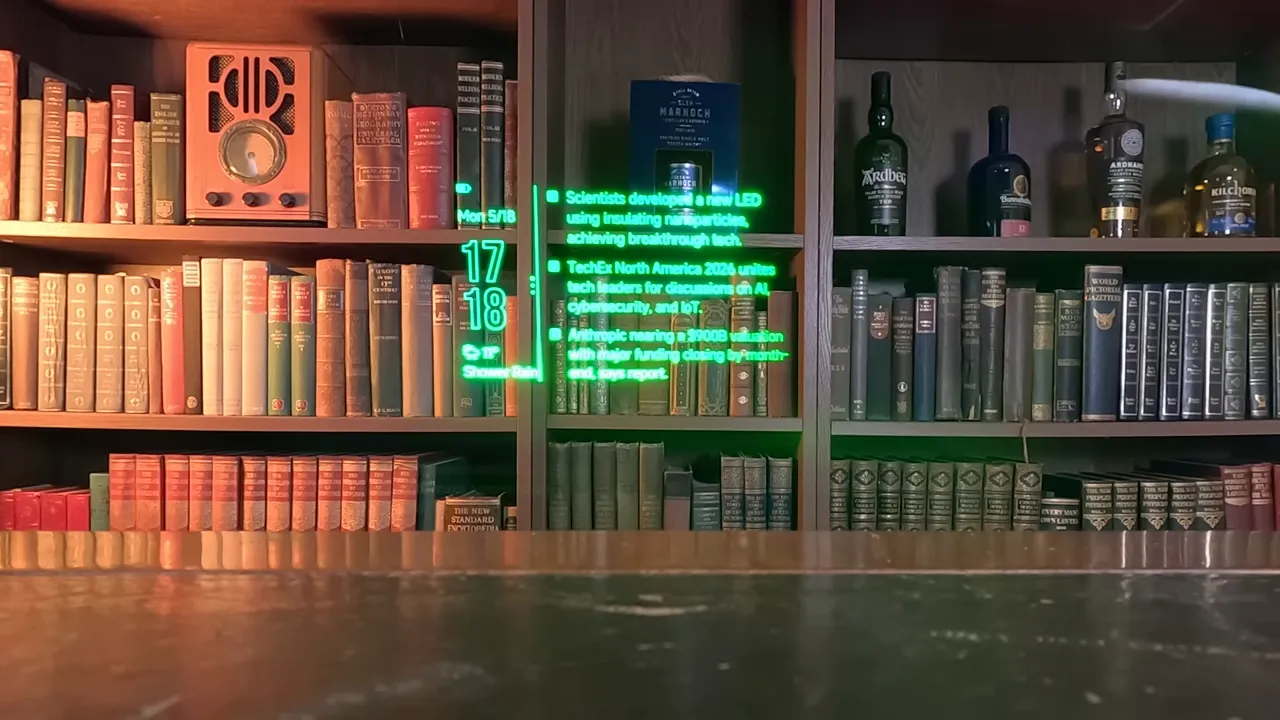
Double-clicking the button opens a three-option quick-launch menu. You then turn your head towards the left, centre, or right option to select it. The companion app lets you customise those shortcuts.
Meeting Recording, Teleprompter, and Live Translation
The useful quick-launch functions include:
- AI recorder: Record meetings and have the AI transcribe them.
- Teleprompter: Add a script in the app, then read it through the glasses. Speech detection follows what you're saying and scrolls at your pace.
- Translator: Display translated speech as text in your vision, effectively giving you subtitles in real life.
The teleprompter is a particularly sensible use of the larger display. Extra lines of text give you more context as you speak, rather than forcing you to chase a narrow strip of words. For presentations and public speaking, that's genuinely useful.
And Then There's Tetris
Buried in the options was something I hadn't expected: Tetris.
You move the pieces by turning your head left and right, then use the button to place them. As a way of testing the accelerometer and gyroscope, it's surprisingly effective. I had nothing to complain about with the accuracy.
Playing Tetris through my glasses is not a sentence I expected to write, but here we are. Whether this is an exciting beginning for smart-glasses gaming or the first step towards having Flappy Bird permanently lodged in our eyeballs is open to debate.
An AI Assistant With Long-Term Context
You can start a conversation with the assistant by holding the button or using its wake phrase. The interaction itself is familiar if you've used a large language model before.
What makes it more interesting is the ability to build contextual long-term memory. Rather than treating everything as an isolated request, the system gradually develops a record of your interactions and information.
Compared with the Meta Ray-Ban experience I've used, which often felt as though each request started afresh, this has much greater potential to become a personal assistant that understands what you're referring to.
There is a practical trade-off. To get the most from that context, you need to make the MemoMind companion app and glasses part of how you organise your life.
That means putting notes, scripts, conversations, recordings, and calendar information into its ecosystem rather than assuming the AI can automatically understand everything scattered across your phone's native apps.
The more relevant information it can access there, the more consistent and useful that memory can become.
Always-Listening Memory Is the Feature That Changed My Opinion
A few weeks into testing, MemoMind added functionality that substantially changed the product for me.
With long-term memory enabled, the glasses can purposefully listen to your conversations and daily life while you're wearing them. You don't have to launch a recording for every interaction or remember to ask the AI to save something.
This is optional functionality, not a claim that the glasses must record continuously. But when enabled, it moves the experience beyond a reactive voice assistant and towards something that works proactively in the background.
I used it on and off for a week. The resulting daily summaries appeared in the app's Moments section, rather like an automatic journal written by a ghostwriter who happens to live on your face.
Each day could receive a title and an AI-generated cover, followed by material such as:
- Highlights and memorable moments.
- Insights, reflections, and recommendations.
- Checklists and workflows.
- Charts and graphs based on what it understood about my activities.
Some of the memorable moments had me laughing. It wasn't just producing dry meeting minutes; it was picking out little comments and exchanges that would otherwise have disappeared into the day.
It also recognised wishes. After overhearing me mention that I wanted an Aston Martin, it created a wishlist entry.
Which, to be clear, remains an accurate assessment.
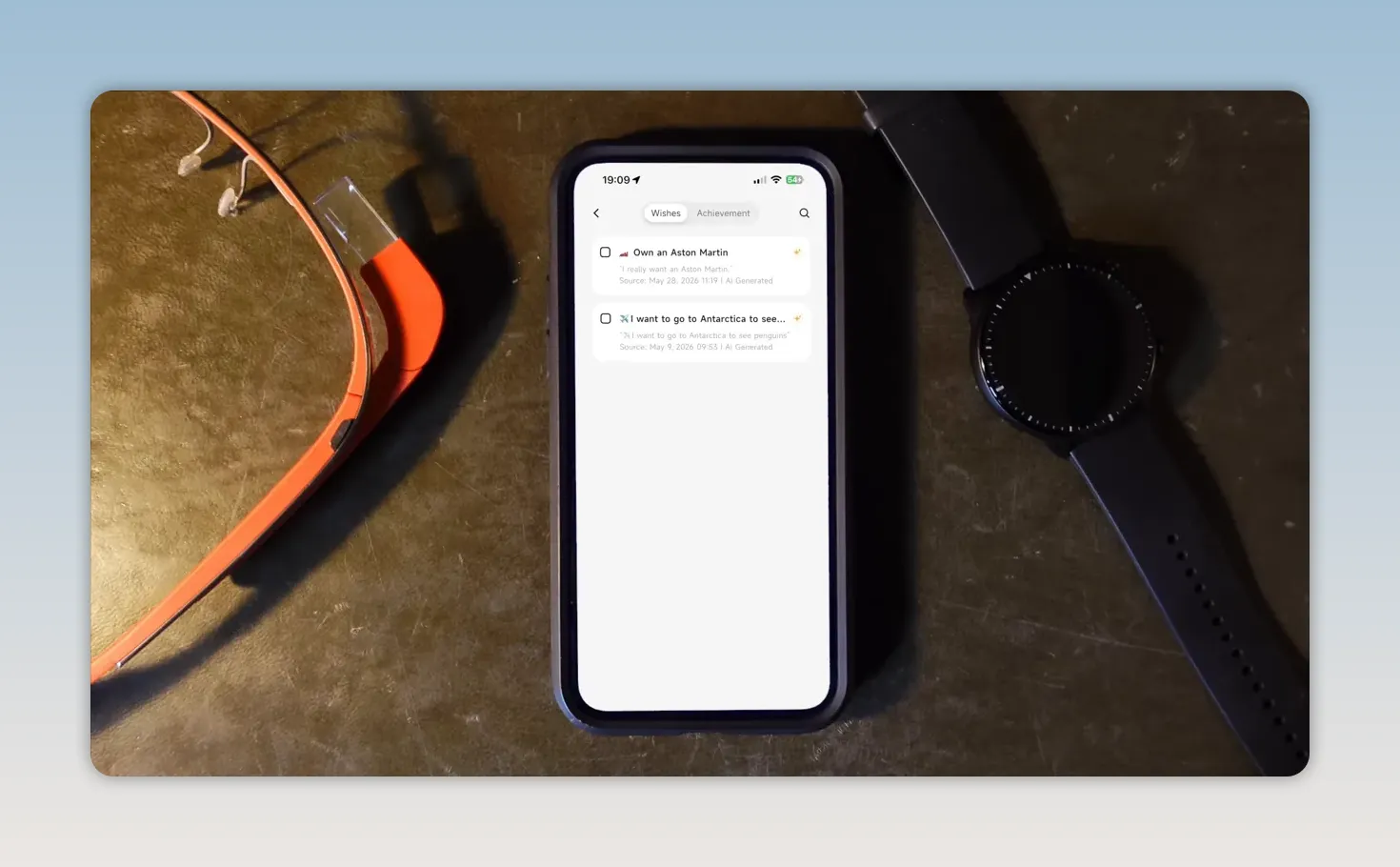
For somebody with a packed schedule, the appeal is obvious. Conversations can become organised notes without another administrative job at the end of the day. It feels like having a PA quietly keeping track of what you've said.
The Big Limitation: It Cannot Understand the Silent Hours
The system is only working with what it can hear. That matters considerably.
It did an excellent job of summarising parts of my working day when I was discussing upcoming reviews with the team or talking about progress on a product. But it missed much of the work I did quietly.
One weekly summary included a chart dividing up my time. It correctly picked up that I spend a lot of time tinkering with technology. It badly underestimated administration.
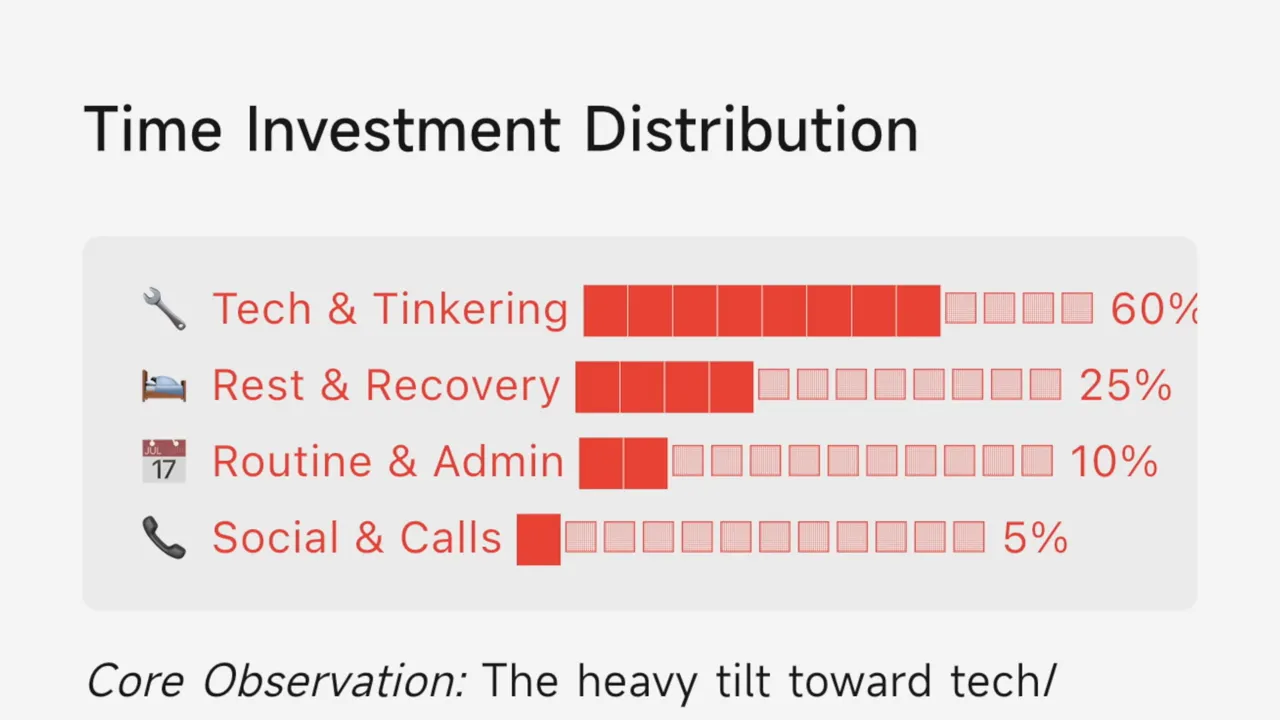
I can spend roughly 50 to 60% of my time at my desk, dealing with my inbox and writing reviews. Because that usually happens in silence or with a little music, the glasses don't have enough information to allocate it properly.
There is no camera, so they lack visual context too. That made me wonder how much more capable a future version with a camera might be, but it also underlines the limitation of this version: an impressive summary is not necessarily a complete account of your day.
Privacy Controls Help, but This Still Deserves Serious Thought
An AI listening throughout your day is not a feature to switch on without thinking. I find the possibilities exhilarating, but I completely understand why somebody else would find the same idea deeply uncomfortable.
MemoMind includes several controls intended to manage what gets captured:
- Stop when removed: You can set the glasses to stop listening when you take them off and put them down.
- No-record hours: Set periods during which listening stops.
- Content filtering: Select topics that the AI is intended to recognise and exclude from the recorded Moments experience.
The topic filtering is particularly interesting because it attempts to apply context rather than relying only on a schedule. These are useful controls, although I wouldn't present their existence as proof that every privacy concern has been solved.
If your work involves sensitive information or conversations that cannot be recorded, that remains a serious consideration.
I spent a fair amount of time thinking about the broader trade-off. Our digital lives already involve extensive behavioural profiling, with services drawing inferences from activity, browsing, location, and connections. That doesn't make additional data collection harmless, but it does make the comparison more complicated than simply deciding that listening is scary and everything else is private.
What attracts me here is the purpose of the experience: helping me organise my own life with less effort, rather than requiring me to keep feeding instructions into another assistant.
I'm not claiming that purpose alone settles the privacy question. It explains why I'm willing to explore the idea despite finding parts of it unsettling.
OpenClaw Integration and the AI Choice I'd Still Like to See
MemoMind has also added optional OpenClaw integration, allowing the glasses to connect to a more fully agentic AI setup. The team has described the platform as open to developers extending it with new experiences.
That's interesting, but I'm sticking with the built-in assistant for now. I'm not quite ready to hand an AI the keys to everything.
There's also a difference between an integration existing and it being approachable. The setup looked daunting even to me, and I enjoy tinkering. I expect most people will stay with the standard MemoMind experience rather than build their own arrangement.
As far as I understand it, the built-in assistant uses a wrapper that draws on different AI models for different tasks. I can see the logic: MemoMind can control the experience and integrate the models closely with its software and memory features.
What I'd still like is a simpler way to choose which large language model I interact with.
My concern goes beyond this particular product. If we're going to rely on AI for more of the information we consume, choice matters. Different models can serve different perspectives, and I don't want convenience to become a reason to stop questioning the answers.
A technically demanding integration is welcome, but it isn't the same as an easy model selector for ordinary users. Greater choice there would make this a much more open experience.
Launch Plans, Ultra Subscription, and Crowdfunding Risks
At the time of my pre-launch testing, MemoMind was targeting a Kickstarter launch towards the end of June, with around June 28 indicated on its website. There was also a reservation option ahead of the Kickstarter early-bird offers, promoted with a substantial discount.
Those were launch plans rather than a guarantee of present availability, so check the current pricing and terms rather than assuming an early offer is still running.
The announced Kickstarter package also included one year of the Ultra subscription. That's important because Ultra is required for the long-term contextual AI experience that impressed me most. The hardware purchase and the ongoing feature access are therefore separate things to consider.
Now for the boring but necessary bit: XGIMI's established presence in consumer technology does not remove the risks of backing a new product through crowdfunding.
Before committing money, read Kickstarter's Trust and Accountability guidance and understand the risks associated with a prototype or pre-launch product. My assessment concerns the device I've tested, not a guarantee that the company will fulfil its crowdfunding promises.
If you're considering a pair, the product page is the place to check the current offer, availability, and subscription details. Product links may earn me an affiliate commission on qualifying purchases.
My Verdict: A Remarkably Refined Glimpse of What's Next
Even Realities introduced me to how appealing discreet display glasses could be. The MemoMind One has strengthened that enthusiasm considerably.
The bigger, brighter display makes information easier to use. The speakers make AI conversations feel more intuitive. The hardware is beautifully put together, and the overall experience was remarkably refined for an early device with features still in beta.
Music quality is limited, the most interesting memory functionality requires Ultra, and the AI's interpretation of your life can miss substantial context. Privacy and model choice also deserve more attention than a shiny feature list might suggest.
But the automatic memory experience is the thing I keep coming back to. An assistant that quietly turns everyday conversations into useful organisation feels meaningfully different from another gadget waiting for a command.
It's impressive. It's a little unnerving. And for a first release from MemoMind, it's certainly got my attention.


